
R-Codes (Bank Returns)
R codes are return codes directly from the bank indicating a payment is rejected.
The most common R codes:
| Code | Reason |
|---|---|
| R01 | Insufficient Funds |
| R02 | Account Closed |
| R03 | No Account/Unable to Locate |
| R04 | Invalid Account Number |
| R09 | Uncollected Funds |
| R16 | Account Frozen |
| R20 | Non-transactional Account |
Chargeback R-Codes (less common, higher fees):
| Code | Reason |
|---|---|
| R05 | Unauthorized Debit to Consumers Account |
| R06 | Returned per ODFI’s Request |
| R07 | Authorization Revoked |
| R08 | Stop Payment |
| R10 | No Authorization |
| R29 | Corporate Not Authorized |
| R51 | RCK Entry: Related Item Ineligible/Entry Improper |
X-Codes (Vendor Blocks)
These codes indicate a repeat failure that was blocked before reaching the bank. X-codes match prior R-codes (ex: R01 → X01) but get stopped at the ACH vendor level which prevents duplicate bank returns.
Example: First failure = R01 (Insufficient Funds).
Next attempt = X01 (same issue, auto-blocked).
C-Codes (Corrections)
Payment funded, but account info wrong—fix for next payment.
| Code | Fix This |
|---|---|
| C01 | Incorrect Account Number |
| C02 | Incorrect Routing Number |
| C03 | Both Account + Routing Incorrect |
| C04 | Incorrect Account Name |
| C05 | Incorrect Transaction Code |
ACH Return Codes in Reporting
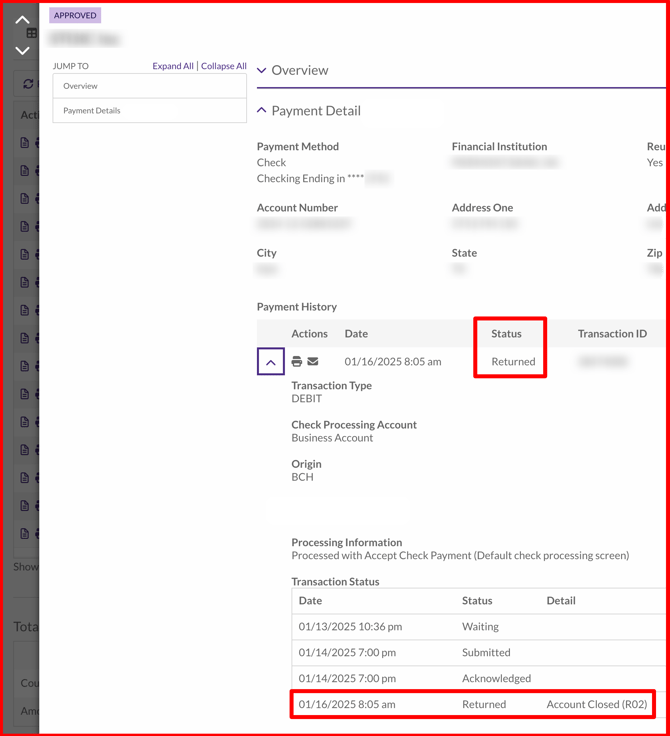
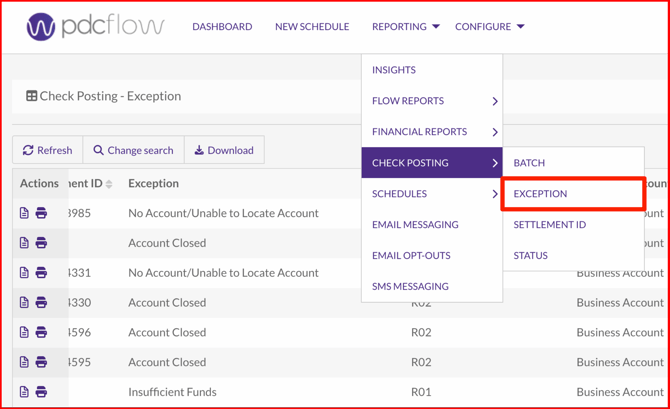
Transaction Reports include ACH return codes where relevant. For example, you can view codes on the transaction's details page and within the check posting's exception report.
Transaction Details
On the details page for the transaction, scroll to the Transaction Status table to view the code details.
Check Posting: Exception Report
To pull a report of all exceptions, navigate to Reporting > Check Posting > Exeption and search for the appropriate date range to view a list of payments with return codes.
Need Help?
Email our Customer Success team at support@pdcflow.com.